About Visma Employee
Stay updated with the latest information: Access your payslips and receive automatic notifications for incoming new ones. Register receipts and mileage expenses and send them for approval. Easily enter your work hours,...
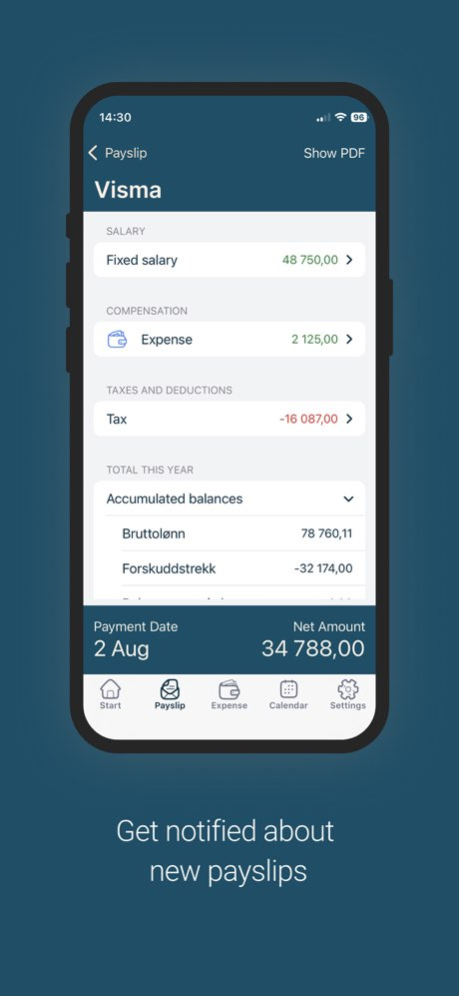
Stay updated with the latest information: Access your payslips and receive automatic notifications for incoming new ones. Register receipts and mileage expenses and send them for approval. Easily enter your work hours, register your sick leave or apply for vacation on the go. Visma Employee is a business app for your mobile device. It provides those currently receiving their payslip from various Visma payroll solutions with quick and easy access to their payslips. View your payslip on the go, when and where suits you. The app also contains an integration with Absence & Expense, so you can easily register sickness, send vacation requests and register all the other event types directly from the app. In the Expense section you can easily take photos of your receipts and create mileage expenses, and send them directly for approval. A streamlined mobile app that allows you to: . View your payslips . See the original payslip (PDF), if you wish to view all details . Export all your payslips to a single PDF . Register absence and attendance . Send vacation requests . Automatically scan receipts and digital images/ PDF documents and register them as expenses . Register mileage expenses by following the map for automatic distance calculation . Send expense claims for approval . Setup automatic notifications for incoming payslips,vacation approval, and more. . Secure your app with a personalized security code/Touch ID Supported languages: Norwegian, Swedish, Danish, Finnish and English If you are wondering if this app works for you, contact your payroll administrator. Some of the features listed will be enabled based on your role.
Version History • Credit card transaction support: This update adds support for credit card transactions. Transactions are imported directly from your bank with prefilled details and can be matched with receipts. Claims can be submitted before bank clearance — once cleared, they are automatically sent for approval. Editing rules ensure transaction data remains consistent with bank records across both web and mobile. • Bugfixes 12.4 Sep 24 General improvements and bugfixes 12.3 Aug 25 General improvements and bugfixes 12.2.1 Aug 10 General improvements and bugfixes 12.2 Jul 13 General improvements and bugfixes 12.1 Jul 2 We've brought Dottie into the mobile app, giving employees access to key workplace information and documents on the go: • Personal information — View and manage your own profile and personal details directly from your phone. • Company benefits — Browse the benefits available to you, all in one place. • Common documents — Access shared, company-wide documents (policies, handbooks, guidelines, etc.). • Personal documents — Find your own documents, such as contracts, securely on your device. • Employee list — Look up colleagues through an in-app directory. 12.0 Jun 26 General improvements and bugfixes 11.12 Jun 11 • Display public holidays in Calendar • Prefilling of duration and distance in transport types • UI Improvements • Bugfixes 11.11 May 11 General improvements and bugfixes 11.10 Apr 14 • Roster in Calendar View — You can now view your full roster information directly from the calendar, giving you a clearer picture of your schedule at a glance. • New Calendar Filters — The calendar view now includes filters for Attendance, Absence, and Supplements, making it easier to find and focus on the information that matters most. • Improved Allowance Types • UI Improvements • Bug Fixes 11.9 Mar 17 • Calendar view improvements: Added the option to show or hide weekends, and the ability to switch between icons and labels for a more personalized layout. • Payslip section redesign: Completely revamped for a cleaner, more intuitive experience, with a clear separation between payslips and year-end reports. • Biometrics authentication improvements: Faster and more reliable sign-in. • UX improvements and bug fixes: Various enhancements to keep things running smoothly. 11.8 Mar 4 • Add multiple attachments per receipt — document your costs more easily on the go • Toggle future registrations in the Calendar summary for a more complete overview • Refreshed Calendar view with UI improvements • Payslip Assistant now suggests questions to help you find what you need faster • Bug fixes and performance improvements 11.7 Feb 17 • Faster Expense Handling: Send expenses directly for approval in just a few taps. • Payslip Bot (Beta): Meet our new Payslip Bot, designed to help you find payslip details quickly. We’d love your feedback while it’s in beta! • UI/UX Enhancements: We’ve polished the interface to make navigation more intuitive. • Bug Fixes 11.6 Jan 26 • Introduced a new Payslip Bot to help users better understand the content of their payslips. • Redesigned start page cards for a cleaner, more intuitive experience. • Updated the colour palette for improved clarity and consistency. • General UI enhancements and bug fixes. 11.5 12/12/2025 • New Monthly Calendar View • Taxable Allowances • UI Improvements & Bug Fixes 11.4 11/19/2025 General improvements and bugfixes 11.3 10/30/2025 General improvements and bugfixes 11.2.1 10/17/2025 General improvements and bugfixes 11.2 10/13/2025 General improvements and bugfixes 11.1 09/10/2025 We’re excited to introduce a new feature in the Employee app! You can now create allowances directly from the app. • You can now create allowances directly from the Employee app as part of our enhanced Expense integration. • No more need to switch between web and mobile app — manage both expenses and allowances from one place. • Easily add, edit, and submit allowances on the go, making your expense reporting faster and more flexible. • In additon, we’ve also made general improvements to keep things running smoothly. 11.0 07/16/2025 General improvements and bugfixes 10.11 07/07/2025 General improvements and bugfixes 10.10 04/03/2025 • Allow login for multiple accounts • Inbox for Calendar messages • Smaller improvements • Bug fixes 10.9 03/20/2025 General improvements and bugfixes 10.8 02/07/2025 • Show year end report for all companies • Testlab for Allowances: users with the Expense role will get the chance to test the mobile design for the allowances flow (3 steps) and provide us with feedback that we will use during our development process • Bug fixes • Smaller improvements 10.7 12/19/2024
Previous Versions
Here you can find the changelog of Visma Employee since it was posted on our website on 2016-11-03 12:10:47.
The latest version is 12.4 and it was updated on 2026-10-07 03:39:41. See below the changes in each version.
Visma Employee version 12.4
Updated At: 2026-10-06
Changes: Version History • Credit card transaction support: This update adds support for credit card transactions. Transactions are imported directly from your bank with prefilled details and can be matched with receipts. Claims can be submitted before bank clearance — once cleared, they are automatically sent for approval. Editing rules ensure transaction data remains consistent with bank records across both web and mobile.
• Bugfixes 12.4 Sep 24 General improvements and bugfixes 12.3 Aug 25 General improvements and bugfixes 12.2.1 Aug 10 General improvements and bugfixes 12.2 Jul 13 General improvements and bugfixes 12.1 Jul 2 We've brought Dottie into the mobile app, giving employees access to key workplace information and documents on the go:
• Personal information — View and manage your own profile and personal details directly from your phone.
• Company benefits — Browse the benefits available to you, all in one place.
• Common documents — Access shared, company-wide documents (policies, handbooks, guidelines, etc.).
• Personal documents — Find your own documents, such as contracts, securely on your device.
• Employee list — Look up colleagues through an in-app directory. 12.0 Jun 26 General improvements and bugfixes 11.12 Jun 11 • Display public holidays in Calendar
• Prefilling of duration and distance in transport types
• UI Improvements
• Bugfixes 11.11 May 11 General improvements and bugfixes 11.10 Apr 14 • Roster in Calendar View — You can now view your full roster information directly from the calendar, giving you a clearer picture of your schedule at a glance.
• New Calendar Filters — The calendar view now includes filters for Attendance, Absence, and Supplements, making it easier to find and focus on the information that matters most.
• Improved Allowance Types
• UI Improvements
• Bug Fixes 11.9 Mar 17 • Calendar view improvements: Added the option to show or hide weekends, and the ability to switch between icons and labels for a more personalized layout.
• Payslip section redesign: Completely revamped for a cleaner, more intuitive experience, with a clear separation between payslips and year-end reports.
• Biometrics authentication improvements: Faster and more reliable sign-in.
• UX improvements and bug fixes: Various enhancements to keep things running smoothly. 11.8 Mar 4 • Add multiple attachments per receipt — document your costs more easily on the go
• Toggle future registrations in the Calendar summary for a more complete overview
• Refreshed Calendar view with UI improvements
• Payslip Assistant now suggests questions to help you find what you need faster
• Bug fixes and performance improvements 11.7 Feb 17 • Faster Expense Handling: Send expenses directly for approval in just a few taps.
• Payslip Bot (Beta): Meet our new Payslip Bot, designed to help you find payslip details quickly. We’d love your feedback while it’s in beta!
• UI/UX Enhancements: We’ve polished the interface to make navigation more intuitive.
• Bug Fixes 11.6 Jan 26 • Introduced a new Payslip Bot to help users better understand the content of their payslips.
• Redesigned start page cards for a cleaner, more intuitive experience.
• Updated the colour palette for improved clarity and consistency.
• General UI enhancements and bug fixes. 11.5 12/12/2025 • New Monthly Calendar View
• Taxable Allowances
• UI Improvements & Bug Fixes 11.4 11/19/2025 General improvements and bugfixes 11.3 10/30/2025 General improvements and bugfixes 11.2.1 10/17/2025 General improvements and bugfixes 11.2 10/13/2025 General improvements and bugfixes 11.1 09/10/2025 We’re excited to introduce a new feature in the Employee app! You can now create allowances directly from the app.
• You can now create allowances directly from the Employee app as part of our enhanced Expense integration.
• No more need to switch between web and mobile app — manage both expenses and allowances from one place.
• Easily add, edit, and submit allowances on the go, making your expense reporting faster and more flexible.
• In additon, we’ve also made general improvements to keep things running smoothly. 11.0 07/16/2025 General improvements and bugfixes 10.11 07/07/2025 General improvements and bugfixes 10.10 04/03/2025 • Allow login for multiple accounts
• Inbox for Calendar messages
• Smaller improvements
• Bug fixes 10.9 03/20/2025 General improvements and bugfixes 10.8 02/07/2025 • Show year end report for all companies
• Testlab for Allowances: users with the Expense role will get the chance to test the mobile design for the allowances flow (3 steps) and provide us with feedback that we will use during our development process
• Bug fixes
• Smaller improvements 10.7 12/19/2024
Visma Employee version 12.4
Updated At: 2026-09-25
Changes: Version History • Credit card transaction support: This update adds support for credit card transactions. Transactions are imported directly from your bank with prefilled details and can be matched with receipts. Claims can be submitted before bank clearance — once cleared, they are automatically sent for approval. Editing rules ensure transaction data remains consistent with bank records across both web and mobile.
• Bugfixes 12.4 1d ago General improvements and bugfixes 12.3 Aug 25 General improvements and bugfixes 12.2.1 Aug 10 General improvements and bugfixes 12.2 Jul 13 General improvements and bugfixes 12.1 Jul 2 We've brought Dottie into the mobile app, giving employees access to key workplace information and documents on the go:
• Personal information — View and manage your own profile and personal details directly from your phone.
• Company benefits — Browse the benefits available to you, all in one place.
• Common documents — Access shared, company-wide documents (policies, handbooks, guidelines, etc.).
• Personal documents — Find your own documents, such as contracts, securely on your device.
• Employee list — Look up colleagues through an in-app directory. 12.0 Jun 26 General improvements and bugfixes 11.12 Jun 11 • Display public holidays in Calendar
• Prefilling of duration and distance in transport types
• UI Improvements
• Bugfixes 11.11 May 11 General improvements and bugfixes 11.10 Apr 14 • Roster in Calendar View — You can now view your full roster information directly from the calendar, giving you a clearer picture of your schedule at a glance.
• New Calendar Filters — The calendar view now includes filters for Attendance, Absence, and Supplements, making it easier to find and focus on the information that matters most.
• Improved Allowance Types
• UI Improvements
• Bug Fixes 11.9 Mar 17 • Calendar view improvements: Added the option to show or hide weekends, and the ability to switch between icons and labels for a more personalized layout.
• Payslip section redesign: Completely revamped for a cleaner, more intuitive experience, with a clear separation between payslips and year-end reports.
• Biometrics authentication improvements: Faster and more reliable sign-in.
• UX improvements and bug fixes: Various enhancements to keep things running smoothly. 11.8 Mar 4 • Add multiple attachments per receipt — document your costs more easily on the go
• Toggle future registrations in the Calendar summary for a more complete overview
• Refreshed Calendar view with UI improvements
• Payslip Assistant now suggests questions to help you find what you need faster
• Bug fixes and performance improvements 11.7 Feb 17 • Faster Expense Handling: Send expenses directly for approval in just a few taps.
• Payslip Bot (Beta): Meet our new Payslip Bot, designed to help you find payslip details quickly. We’d love your feedback while it’s in beta!
• UI/UX Enhancements: We’ve polished the interface to make navigation more intuitive.
• Bug Fixes 11.6 Jan 26 • Introduced a new Payslip Bot to help users better understand the content of their payslips.
• Redesigned start page cards for a cleaner, more intuitive experience.
• Updated the colour palette for improved clarity and consistency.
• General UI enhancements and bug fixes. 11.5 12/12/2025 • New Monthly Calendar View
• Taxable Allowances
• UI Improvements & Bug Fixes 11.4 11/19/2025 General improvements and bugfixes 11.3 10/30/2025 General improvements and bugfixes 11.2.1 10/17/2025 General improvements and bugfixes 11.2 10/13/2025 General improvements and bugfixes 11.1 09/10/2025 We’re excited to introduce a new feature in the Employee app! You can now create allowances directly from the app.
• You can now create allowances directly from the Employee app as part of our enhanced Expense integration.
• No more need to switch between web and mobile app — manage both expenses and allowances from one place.
• Easily add, edit, and submit allowances on the go, making your expense reporting faster and more flexible.
• In additon, we’ve also made general improvements to keep things running smoothly. 11.0 07/16/2025 General improvements and bugfixes 10.11 07/07/2025 General improvements and bugfixes 10.10 04/03/2025 • Allow login for multiple accounts
• Inbox for Calendar messages
• Smaller improvements
• Bug fixes 10.9 03/20/2025 General improvements and bugfixes 10.8 02/07/2025 • Show year end report for all companies
• Testlab for Allowances: users with the Expense role will get the chance to test the mobile design for the allowances flow (3 steps) and provide us with feedback that we will use during our development process
• Bug fixes
• Smaller improvements 10.7 12/19/2024
Visma Employee version 12.3
Updated At: 2026-09-18
Changes: Version History General improvements and bugfixes 12.3 Aug 25 General improvements and bugfixes 12.2.1 Aug 10 General improvements and bugfixes 12.2 Jul 13 General improvements and bugfixes 12.1 Jul 2 We've brought Dottie into the mobile app, giving employees access to key workplace information and documents on the go:
• Personal information — View and manage your own profile and personal details directly from your phone.
• Company benefits — Browse the benefits available to you, all in one place.
• Common documents — Access shared, company-wide documents (policies, handbooks, guidelines, etc.).
• Personal documents — Find your own documents, such as contracts, securely on your device.
• Employee list — Look up colleagues through an in-app directory. 12.0 Jun 26 General improvements and bugfixes 11.12 Jun 11 • Display public holidays in Calendar
• Prefilling of duration and distance in transport types
• UI Improvements
• Bugfixes 11.11 May 11 General improvements and bugfixes 11.10 Apr 14 • Roster in Calendar View — You can now view your full roster information directly from the calendar, giving you a clearer picture of your schedule at a glance.
• New Calendar Filters — The calendar view now includes filters for Attendance, Absence, and Supplements, making it easier to find and focus on the information that matters most.
• Improved Allowance Types
• UI Improvements
• Bug Fixes 11.9 Mar 17 • Calendar view improvements: Added the option to show or hide weekends, and the ability to switch between icons and labels for a more personalized layout.
• Payslip section redesign: Completely revamped for a cleaner, more intuitive experience, with a clear separation between payslips and year-end reports.
• Biometrics authentication improvements: Faster and more reliable sign-in.
• UX improvements and bug fixes: Various enhancements to keep things running smoothly. 11.8 Mar 4 • Add multiple attachments per receipt — document your costs more easily on the go
• Toggle future registrations in the Calendar summary for a more complete overview
• Refreshed Calendar view with UI improvements
• Payslip Assistant now suggests questions to help you find what you need faster
• Bug fixes and performance improvements 11.7 Feb 17 • Faster Expense Handling: Send expenses directly for approval in just a few taps.
• Payslip Bot (Beta): Meet our new Payslip Bot, designed to help you find payslip details quickly. We’d love your feedback while it’s in beta!
• UI/UX Enhancements: We’ve polished the interface to make navigation more intuitive.
• Bug Fixes 11.6 Jan 26 • Introduced a new Payslip Bot to help users better understand the content of their payslips.
• Redesigned start page cards for a cleaner, more intuitive experience.
• Updated the colour palette for improved clarity and consistency.
• General UI enhancements and bug fixes. 11.5 12/12/2025 • New Monthly Calendar View
• Taxable Allowances
• UI Improvements & Bug Fixes 11.4 11/19/2025 General improvements and bugfixes 11.3 10/30/2025 General improvements and bugfixes 11.2.1 10/17/2025 General improvements and bugfixes 11.2 10/13/2025 General improvements and bugfixes 11.1 09/10/2025 We’re excited to introduce a new feature in the Employee app! You can now create allowances directly from the app.
• You can now create allowances directly from the Employee app as part of our enhanced Expense integration.
• No more need to switch between web and mobile app — manage both expenses and allowances from one place.
• Easily add, edit, and submit allowances on the go, making your expense reporting faster and more flexible.
• In additon, we’ve also made general improvements to keep things running smoothly. 11.0 07/16/2025 General improvements and bugfixes 10.11 07/07/2025 General improvements and bugfixes 10.10 04/03/2025 • Allow login for multiple accounts
• Inbox for Calendar messages
• Smaller improvements
• Bug fixes 10.9 03/20/2025 General improvements and bugfixes 10.8 02/07/2025 • Show year end report for all companies
• Testlab for Allowances: users with the Expense role will get the chance to test the mobile design for the allowances flow (3 steps) and provide us with feedback that we will use during our development process
• Bug fixes
• Smaller improvements 10.7 12/19/2024 Show users personal information in app 10.6.1 12/06/2024
Visma Employee version 12.2.1
Updated At: 2026-08-23
Changes: Version History General improvements and bugfixes 12.2.1 Aug 10 General improvements and bugfixes 12.2 Jul 13 General improvements and bugfixes 12.1 Jul 2 We've brought Dottie into the mobile app, giving employees access to key workplace information and documents on the go:
• Personal information — View and manage your own profile and personal details directly from your phone.
• Company benefits — Browse the benefits available to you, all in one place.
• Common documents — Access shared, company-wide documents (policies, handbooks, guidelines, etc.).
• Personal documents — Find your own documents, such as contracts, securely on your device.
• Employee list — Look up colleagues through an in-app directory. 12.0 Jun 26 General improvements and bugfixes 11.12 Jun 11 • Display public holidays in Calendar
• Prefilling of duration and distance in transport types
• UI Improvements
• Bugfixes 11.11 May 11 General improvements and bugfixes 11.10 Apr 14 • Roster in Calendar View — You can now view your full roster information directly from the calendar, giving you a clearer picture of your schedule at a glance.
• New Calendar Filters — The calendar view now includes filters for Attendance, Absence, and Supplements, making it easier to find and focus on the information that matters most.
• Improved Allowance Types
• UI Improvements
• Bug Fixes 11.9 Mar 17 • Calendar view improvements: Added the option to show or hide weekends, and the ability to switch between icons and labels for a more personalized layout.
• Payslip section redesign: Completely revamped for a cleaner, more intuitive experience, with a clear separation between payslips and year-end reports.
• Biometrics authentication improvements: Faster and more reliable sign-in.
• UX improvements and bug fixes: Various enhancements to keep things running smoothly. 11.8 Mar 4 • Add multiple attachments per receipt — document your costs more easily on the go
• Toggle future registrations in the Calendar summary for a more complete overview
• Refreshed Calendar view with UI improvements
• Payslip Assistant now suggests questions to help you find what you need faster
• Bug fixes and performance improvements 11.7 Feb 17 • Faster Expense Handling: Send expenses directly for approval in just a few taps.
• Payslip Bot (Beta): Meet our new Payslip Bot, designed to help you find payslip details quickly. We’d love your feedback while it’s in beta!
• UI/UX Enhancements: We’ve polished the interface to make navigation more intuitive.
• Bug Fixes 11.6 Jan 26 • Introduced a new Payslip Bot to help users better understand the content of their payslips.
• Redesigned start page cards for a cleaner, more intuitive experience.
• Updated the colour palette for improved clarity and consistency.
• General UI enhancements and bug fixes. 11.5 12/12/2025 • New Monthly Calendar View
• Taxable Allowances
• UI Improvements & Bug Fixes 11.4 11/19/2025 General improvements and bugfixes 11.3 10/30/2025 General improvements and bugfixes 11.2.1 10/17/2025 General improvements and bugfixes 11.2 10/13/2025 General improvements and bugfixes 11.1 09/10/2025 We’re excited to introduce a new feature in the Employee app! You can now create allowances directly from the app.
• You can now create allowances directly from the Employee app as part of our enhanced Expense integration.
• No more need to switch between web and mobile app — manage both expenses and allowances from one place.
• Easily add, edit, and submit allowances on the go, making your expense reporting faster and more flexible.
• In additon, we’ve also made general improvements to keep things running smoothly. 11.0 07/16/2025 General improvements and bugfixes 10.11 07/07/2025 General improvements and bugfixes 10.10 04/03/2025 • Allow login for multiple accounts
• Inbox for Calendar messages
• Smaller improvements
• Bug fixes 10.9 03/20/2025 General improvements and bugfixes 10.8 02/07/2025 • Show year end report for all companies
• Testlab for Allowances: users with the Expense role will get the chance to test the mobile design for the allowances flow (3 steps) and provide us with feedback that we will use during our development process
• Bug fixes
• Smaller improvements 10.7 12/19/2024 Show users personal information in app 10.6.1 12/06/2024 • Show accumulated balances in payslip details page
• Show users personal information in app
• Improvements in navigation flows inside claims
• UI refinements in the Payslips page
• Bug fixes 10.6 12/05/2024
Visma Employee version 12.2
Updated At: 2026-07-30
Changes: Version History General improvements and bugfixes 12.2 Jul 13 General improvements and bugfixes 12.1 Jul 2 We've brought Dottie into the mobile app, giving employees access to key workplace information and documents on the go:
• Personal information — View and manage your own profile and personal details directly from your phone.
• Company benefits — Browse the benefits available to you, all in one place.
• Common documents — Access shared, company-wide documents (policies, handbooks, guidelines, etc.).
• Personal documents — Find your own documents, such as contracts, securely on your device.
• Employee list — Look up colleagues through an in-app directory. 12.0 Jun 26 General improvements and bugfixes 11.12 Jun 11 • Display public holidays in Calendar
• Prefilling of duration and distance in transport types
• UI Improvements
• Bugfixes 11.11 May 11 General improvements and bugfixes 11.10 Apr 14 • Roster in Calendar View — You can now view your full roster information directly from the calendar, giving you a clearer picture of your schedule at a glance.
• New Calendar Filters — The calendar view now includes filters for Attendance, Absence, and Supplements, making it easier to find and focus on the information that matters most.
• Improved Allowance Types
• UI Improvements
• Bug Fixes 11.9 Mar 17 • Calendar view improvements: Added the option to show or hide weekends, and the ability to switch between icons and labels for a more personalized layout.
• Payslip section redesign: Completely revamped for a cleaner, more intuitive experience, with a clear separation between payslips and year-end reports.
• Biometrics authentication improvements: Faster and more reliable sign-in.
• UX improvements and bug fixes: Various enhancements to keep things running smoothly. 11.8 Mar 4 • Add multiple attachments per receipt — document your costs more easily on the go
• Toggle future registrations in the Calendar summary for a more complete overview
• Refreshed Calendar view with UI improvements
• Payslip Assistant now suggests questions to help you find what you need faster
• Bug fixes and performance improvements 11.7 Feb 17 • Faster Expense Handling: Send expenses directly for approval in just a few taps.
• Payslip Bot (Beta): Meet our new Payslip Bot, designed to help you find payslip details quickly. We’d love your feedback while it’s in beta!
• UI/UX Enhancements: We’ve polished the interface to make navigation more intuitive.
• Bug Fixes 11.6 Jan 26 • Introduced a new Payslip Bot to help users better understand the content of their payslips.
• Redesigned start page cards for a cleaner, more intuitive experience.
• Updated the colour palette for improved clarity and consistency.
• General UI enhancements and bug fixes. 11.5 12/12/2025 • New Monthly Calendar View
• Taxable Allowances
• UI Improvements & Bug Fixes 11.4 11/19/2025 General improvements and bugfixes 11.3 10/30/2025 General improvements and bugfixes 11.2.1 10/17/2025 General improvements and bugfixes 11.2 10/13/2025 General improvements and bugfixes 11.1 09/10/2025 We’re excited to introduce a new feature in the Employee app! You can now create allowances directly from the app.
• You can now create allowances directly from the Employee app as part of our enhanced Expense integration.
• No more need to switch between web and mobile app — manage both expenses and allowances from one place.
• Easily add, edit, and submit allowances on the go, making your expense reporting faster and more flexible.
• In additon, we’ve also made general improvements to keep things running smoothly. 11.0 07/16/2025 General improvements and bugfixes 10.11 07/07/2025 General improvements and bugfixes 10.10 04/03/2025 • Allow login for multiple accounts
• Inbox for Calendar messages
• Smaller improvements
• Bug fixes 10.9 03/20/2025 General improvements and bugfixes 10.8 02/07/2025 • Show year end report for all companies
• Testlab for Allowances: users with the Expense role will get the chance to test the mobile design for the allowances flow (3 steps) and provide us with feedback that we will use during our development process
• Bug fixes
• Smaller improvements 10.7 12/19/2024 Show users personal information in app 10.6.1 12/06/2024 • Show accumulated balances in payslip details page
• Show users personal information in app
• Improvements in navigation flows inside claims
• UI refinements in the Payslips page
• Bug fixes 10.6 12/05/2024 General improvements and bugfixes 10.5 10/08/2024
Visma Employee version 12.0
Updated At: 2026-06-30
Changes: Version History We've brought Dottie into the mobile app, giving employees access to key workplace information and documents on the go:
• Personal information — View and manage your own profile and personal details directly from your phone.
• Company benefits — Browse the benefits available to you, all in one place.
• Common documents — Access shared, company-wide documents (policies, handbooks, guidelines, etc.).
• Personal documents — Find your own documents, such as contracts, securely on your device.
• Employee list — Look up colleagues through an in-app directory. 12.0 4d ago General improvements and bugfixes 11.12 Jun 11 • Display public holidays in Calendar
• Prefilling of duration and distance in transport types
• UI Improvements
• Bugfixes 11.11 May 11 General improvements and bugfixes 11.10 Apr 14 • Roster in Calendar View — You can now view your full roster information directly from the calendar, giving you a clearer picture of your schedule at a glance.
• New Calendar Filters — The calendar view now includes filters for Attendance, Absence, and Supplements, making it easier to find and focus on the information that matters most.
• Improved Allowance Types
• UI Improvements
• Bug Fixes 11.9 Mar 17 • Calendar view improvements: Added the option to show or hide weekends, and the ability to switch between icons and labels for a more personalized layout.
• Payslip section redesign: Completely revamped for a cleaner, more intuitive experience, with a clear separation between payslips and year-end reports.
• Biometrics authentication improvements: Faster and more reliable sign-in.
• UX improvements and bug fixes: Various enhancements to keep things running smoothly. 11.8 Mar 4 • Add multiple attachments per receipt — document your costs more easily on the go
• Toggle future registrations in the Calendar summary for a more complete overview
• Refreshed Calendar view with UI improvements
• Payslip Assistant now suggests questions to help you find what you need faster
• Bug fixes and performance improvements 11.7 Feb 17 • Faster Expense Handling: Send expenses directly for approval in just a few taps.
• Payslip Bot (Beta): Meet our new Payslip Bot, designed to help you find payslip details quickly. We’d love your feedback while it’s in beta!
• UI/UX Enhancements: We’ve polished the interface to make navigation more intuitive.
• Bug Fixes 11.6 Jan 26 • Introduced a new Payslip Bot to help users better understand the content of their payslips.
• Redesigned start page cards for a cleaner, more intuitive experience.
• Updated the colour palette for improved clarity and consistency.
• General UI enhancements and bug fixes. 11.5 12/12/2025 • New Monthly Calendar View
• Taxable Allowances
• UI Improvements & Bug Fixes 11.4 11/19/2025 General improvements and bugfixes 11.3 10/30/2025 General improvements and bugfixes 11.2.1 10/17/2025 General improvements and bugfixes 11.2 10/13/2025 General improvements and bugfixes 11.1 09/10/2025 We’re excited to introduce a new feature in the Employee app! You can now create allowances directly from the app.
• You can now create allowances directly from the Employee app as part of our enhanced Expense integration.
• No more need to switch between web and mobile app — manage both expenses and allowances from one place.
• Easily add, edit, and submit allowances on the go, making your expense reporting faster and more flexible.
• In additon, we’ve also made general improvements to keep things running smoothly. 11.0 07/16/2025 General improvements and bugfixes 10.11 07/07/2025 General improvements and bugfixes 10.10 04/03/2025 • Allow login for multiple accounts
• Inbox for Calendar messages
• Smaller improvements
• Bug fixes 10.9 03/20/2025 General improvements and bugfixes 10.8 02/07/2025 • Show year end report for all companies
• Testlab for Allowances: users with the Expense role will get the chance to test the mobile design for the allowances flow (3 steps) and provide us with feedback that we will use during our development process
• Bug fixes
• Smaller improvements 10.7 12/19/2024 Show users personal information in app 10.6.1 12/06/2024 • Show accumulated balances in payslip details page
• Show users personal information in app
• Improvements in navigation flows inside claims
• UI refinements in the Payslips page
• Bug fixes 10.6 12/05/2024 General improvements and bugfixes 10.5 10/08/2024 General improvements and bugfixes 10.4.2 09/20/2024 General improvements and bugfixes 10.4.1 09/19/2024
Visma Employee version 11.11
Updated At: 2026-06-10
Changes: Version History • Display public holidays in Calendar
• Prefilling of duration and distance in transport types
• UI Improvements
• Bugfixes 11.11 May 11 General improvements and bugfixes 11.10 Apr 14 • Roster in Calendar View — You can now view your full roster information directly from the calendar, giving you a clearer picture of your schedule at a glance.
• New Calendar Filters — The calendar view now includes filters for Attendance, Absence, and Supplements, making it easier to find and focus on the information that matters most.
• Improved Allowance Types
• UI Improvements
• Bug Fixes 11.9 Mar 17 • Calendar view improvements: Added the option to show or hide weekends, and the ability to switch between icons and labels for a more personalized layout.
• Payslip section redesign: Completely revamped for a cleaner, more intuitive experience, with a clear separation between payslips and year-end reports.
• Biometrics authentication improvements: Faster and more reliable sign-in.
• UX improvements and bug fixes: Various enhancements to keep things running smoothly. 11.8 Mar 4 • Add multiple attachments per receipt — document your costs more easily on the go
• Toggle future registrations in the Calendar summary for a more complete overview
• Refreshed Calendar view with UI improvements
• Payslip Assistant now suggests questions to help you find what you need faster
• Bug fixes and performance improvements 11.7 Feb 17 • Faster Expense Handling: Send expenses directly for approval in just a few taps.
• Payslip Bot (Beta): Meet our new Payslip Bot, designed to help you find payslip details quickly. We’d love your feedback while it’s in beta!
• UI/UX Enhancements: We’ve polished the interface to make navigation more intuitive.
• Bug Fixes 11.6 Jan 26 • Introduced a new Payslip Bot to help users better understand the content of their payslips.
• Redesigned start page cards for a cleaner, more intuitive experience.
• Updated the colour palette for improved clarity and consistency.
• General UI enhancements and bug fixes. 11.5 12/12/2025 • New Monthly Calendar View
• Taxable Allowances
• UI Improvements & Bug Fixes 11.4 11/19/2025 General improvements and bugfixes 11.3 10/30/2025 General improvements and bugfixes 11.2.1 10/17/2025 General improvements and bugfixes 11.2 10/13/2025 General improvements and bugfixes 11.1 09/10/2025 We’re excited to introduce a new feature in the Employee app! You can now create allowances directly from the app.
• You can now create allowances directly from the Employee app as part of our enhanced Expense integration.
• No more need to switch between web and mobile app — manage both expenses and allowances from one place.
• Easily add, edit, and submit allowances on the go, making your expense reporting faster and more flexible.
• In additon, we’ve also made general improvements to keep things running smoothly. 11.0 07/16/2025 General improvements and bugfixes 10.11 07/07/2025 General improvements and bugfixes 10.10 04/03/2025 • Allow login for multiple accounts
• Inbox for Calendar messages
• Smaller improvements
• Bug fixes 10.9 03/20/2025 General improvements and bugfixes 10.8 02/07/2025 • Show year end report for all companies
• Testlab for Allowances: users with the Expense role will get the chance to test the mobile design for the allowances flow (3 steps) and provide us with feedback that we will use during our development process
• Bug fixes
• Smaller improvements 10.7 12/19/2024 Show users personal information in app 10.6.1 12/06/2024 • Show accumulated balances in payslip details page
• Show users personal information in app
• Improvements in navigation flows inside claims
• UI refinements in the Payslips page
• Bug fixes 10.6 12/05/2024 General improvements and bugfixes 10.5 10/08/2024 General improvements and bugfixes 10.4.2 09/20/2024 General improvements and bugfixes 10.4.1 09/19/2024 • Improvements in our Employee Assistant:
• Voice-to-text: Now you can use the mic icon in the text input field.
• Balances: the assistant can provide you with the current status of your balances like vacation or sickness
• Payslips for all companies. For users with the same account and several companies, you can now see all payslips in one page, regardless of the company you have selected.
• Larger font sizes supported in iOS 10.4 09/16/2024 General improvements and bugfixes 10.3.1 08/22/2024
Visma Employee version 11.8
Updated At: 2026-03-04
Changes: • Calendar view improvements: Added the option to show or hide weekends, and the ability to switch between icons and labels for a more personalized layout.
• Payslip section redesign: Completely revamped for a cleaner, more intuitive experience, with a clear separation between payslips and year-end reports.
• Biometrics authentication improvements: Faster and more reliable sign-in.
• UX improvements and bug fixes: Various enhancements to keep things running smoothly.
Visma Employee version 11.7
Updated At: 2026-02-17
Changes: • Add multiple attachments per receipt — document your costs more easily on the go
• Toggle future registrations in the Calendar summary for a more complete overview
• Refreshed Calendar view with UI improvements
• Payslip Assistant now suggests questions to help you find what you need faster
• Bug fixes and performance improvements
Visma Employee version 11.6
Updated At: 2026-01-26
Changes: • Faster Expense Handling: Send expenses directly for approval in just a few taps.
• Payslip Bot (Beta): Meet our new Payslip Bot, designed to help you find payslip details quickly. We’d love your feedback while it’s in beta!
• UI/UX Enhancements: We’ve polished the interface to make navigation more intuitive.
• Bug Fixes
Disclaimer
Official App Store Link
We do not host Visma Employee on our servers. We did not scan it for viruses, adware, spyware or other type of malware. This app is hosted by Apple and passed their terms and conditions to be listed there. We recommend caution when installing it.
The App Store link for Visma Employee is provided to you by apps112.com without any warranties, representations or guarantees of any kind, so access it at your own risk.
If you have questions regarding this particular app contact the publisher directly. For questions about the functionalities of apps112.com contact us.